The 2026 AI Workflow for Shopify Developers: Claude Code, Shopify AI Toolkit, CLI & AGENTS.md

Shopify development changed more between 2024 and 2026 than in the five years before. AI moved from a chat window on the side to an agent working inside the project, and Shopify rebuilt its own tooling around that shift. Here is what changed, and how to work with it.
How Much Shopify Development Has Changed
Consider a routine request: a product page section that shows care instructions from a metafield. Two years ago, that was a morning’s work. You looked up the metafield syntax, searched forums to check whether the answer still applied to the current API version, copied a snippet from an older project, adapted it, and refreshed the preview until the layout held. Schema settings, translations, and testing came after that.
Today the same request takes one sentence. The agent reads the theme to learn its conventions, checks the Liquid against Shopify’s documentation, writes the section with its settings and translations, runs theme check, and fixes what it finds. The developer reviews a diff and a preview. In our projects, this kind of task dropped from two to three hours to under forty minutes, review included.
The shift runs through every part of the job. Research that took hours takes minutes, because the agent searches Shopify’s docs and validates every query against the live schema. Debugging is no longer a cycle of edit and refresh; the agent runs the checks and corrects its own errors. Testing has moved from clicking through previews to an agent working through each requirement in a browser, and code review no longer waits on one busy senior developer.
Even the way teams share knowledge has changed. Conventions that once lived in people’s heads or an outdated wiki now sit in the repository, in files such as AGENTS.md, so every agent session starts with the same rules. Shopify has rebuilt its platform around the same idea: app templates handle authentication from day one, webhooks can be filtered to the exact changes an app needs, App Pricing replaces hand-built billing, and apps can answer merchants directly inside Sidekick.
The deepest change is in the role itself. A solo developer can now take on work that once needed a small team, and the job has moved from typing code to judgment: defining what to build, setting the rules, reviewing the result, and deciding what ships. Developers who make that shift aren’t just faster. They’re doing a different job.
Working With AI on Shopify Projects
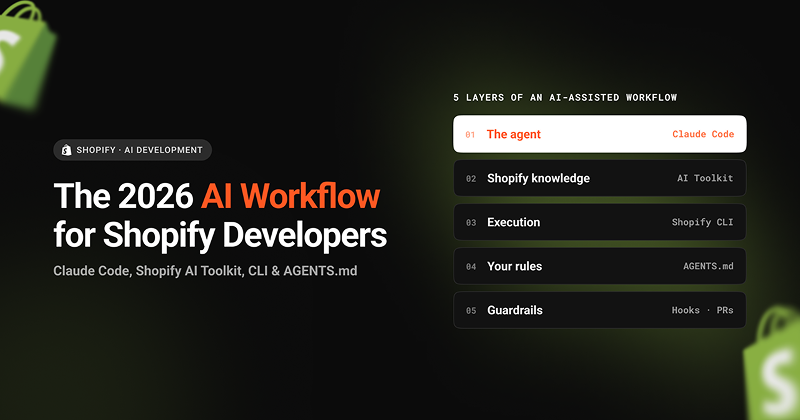
An AI-assisted Shopify workflow runs on five layers:
Set it up in 15 minutes
- Install the Shopify CLI (
npm install -g @shopify/cli@latest) and Claude Code, then runclaudein your theme or app folder. - Add the Shopify AI Toolkit:
/plugin marketplace add Shopify/shopify-ai-toolkit, then/plugin install shopify-plugin@shopify-ai-toolkit. - Run
/initto draft aCLAUDE.md, and add your project rules. - Start read-only: “Explain how this theme’s product page works. Don’t change anything.”
Write your rules once
The gap between teams that dabble and teams that ship fast isn’t the AI model. It’s a few files in the repo. Even Shopify now ships AGENTS.md in its Hydrogen starter template.
- AGENTS.md: your project’s rules, like onboarding notes for a teammate: theme structure, dev store, conventions, and what never to do. When the agent repeats a mistake, add a rule.
- Skills, commands, and subagents: reusable know-how (Shopify ships official skills in the AI Toolkit), shortcuts like
/new-section, and a read-only reviewer that checks every change. - Specs: a short file with a feature’s goal and acceptance criteria, written before any code.
- settings.json guardrails: hooks that run
shopify theme checkafter every edit, and permission rules that block publishing and require approval for deploys.
A short AGENTS.md for a theme project might look like this:
# Agent guide: Acme Store theme- Horizon-based theme; features go in blocks/, sections/, or snippets/- Dev store: acme-dev.myshopify.com (never the live store)- Every section needs a schema with labels in locales/- Prices use the money filter; cart values are in cents## Never- Publish a theme or edit config/settings_data.json- Add third-party scripts## Before you finishRun shopify theme check and explain how to test the change.
Getting reliable results
- Plan before building. Use plan mode for anything touching more than a couple of files, and correct the plan before any code is written.
- Keep tasks small. One feature per branch and per session gives cleaner diffs and easier reviews.
- Ask for the reasoning. Have the agent explain what it changed and why, so the review takes minutes, not hours.
Two Real Examples
Every task follows one loop: spec → plan → build → test → review → ship. The agent builds and tests; you write the spec, approve the plan, and decide what ships.
Theme: a free-shipping progress bar. This used to take half a day of reading cart code, looking up Liquid filters, and refreshing. Now you write a five-line spec, let the agent plan in plan mode, and approve it. The agent builds a theme block, validates the Liquid with the AI Toolkit while hooks run theme check, then tests every requirement in the browser. The reviewer agent checks accessibility, the agent opens a pull request, and after the client approves, you publish, because the agent isn’t allowed to.
App: low-stock alerts with Sidekick. This once meant hand-written webhooks that fired on every product edit, and data merchants could only see by opening the app. Now the agent plans the minimum scopes, uses Next Gen Events so the app hears only about inventory changes, and weighs a static app with no server. It builds the page with schema-validated queries, adds a Sidekick extension so merchants can simply ask “What’s running low?”, and tracks usage with App Events. Testing happens on a development store: lower a product’s stock, then check the admin page, the event log in the Dev Dashboard, and Sidekick’s answer. After pull request review, the agent asks permission to deploy, and you approve it.
Safety in One Minute
- Work on dev stores and unpublished themes, never the live store.
- Give AI the smallest, read-only scopes, and keep secrets in environment variables.
- Enforce rules with permissions and hooks, commit before each session, and review every diff.
- Get client consent before connecting AI to store data, and test checkout and payment logic by hand.
What to Watch Next
- Agentic commerce. Shopify’s Universal Commerce Protocol, co-developed with Google, is open to every developer. Expect clients to ask for stores that AI shopping agents can browse and buy from, including the storefront
agents.mdandllms.txtfiles Shopify now supports. - Sidekick everywhere. Merchants increasingly ask Sidekick instead of opening apps, so apps that answer inside Sidekick will stand out.
- Longer agent runs. Agents now handle multi-hour work such as full theme migrations, which makes clear specs and firm guardrails your biggest advantage.
Want help bringing AI into your Shopify workflow? Talk to our team about setting up an AI-assisted development process for your store or agency.